Page analytics | Rodeo Docs
Page analytics show how many people read a page, inside your workspace and on its published site, so you know whether the onboarding guide is actually opened, which client actually read the proposal, and where your site's visitors come from.
Do it
Open any page, or a database row's page.
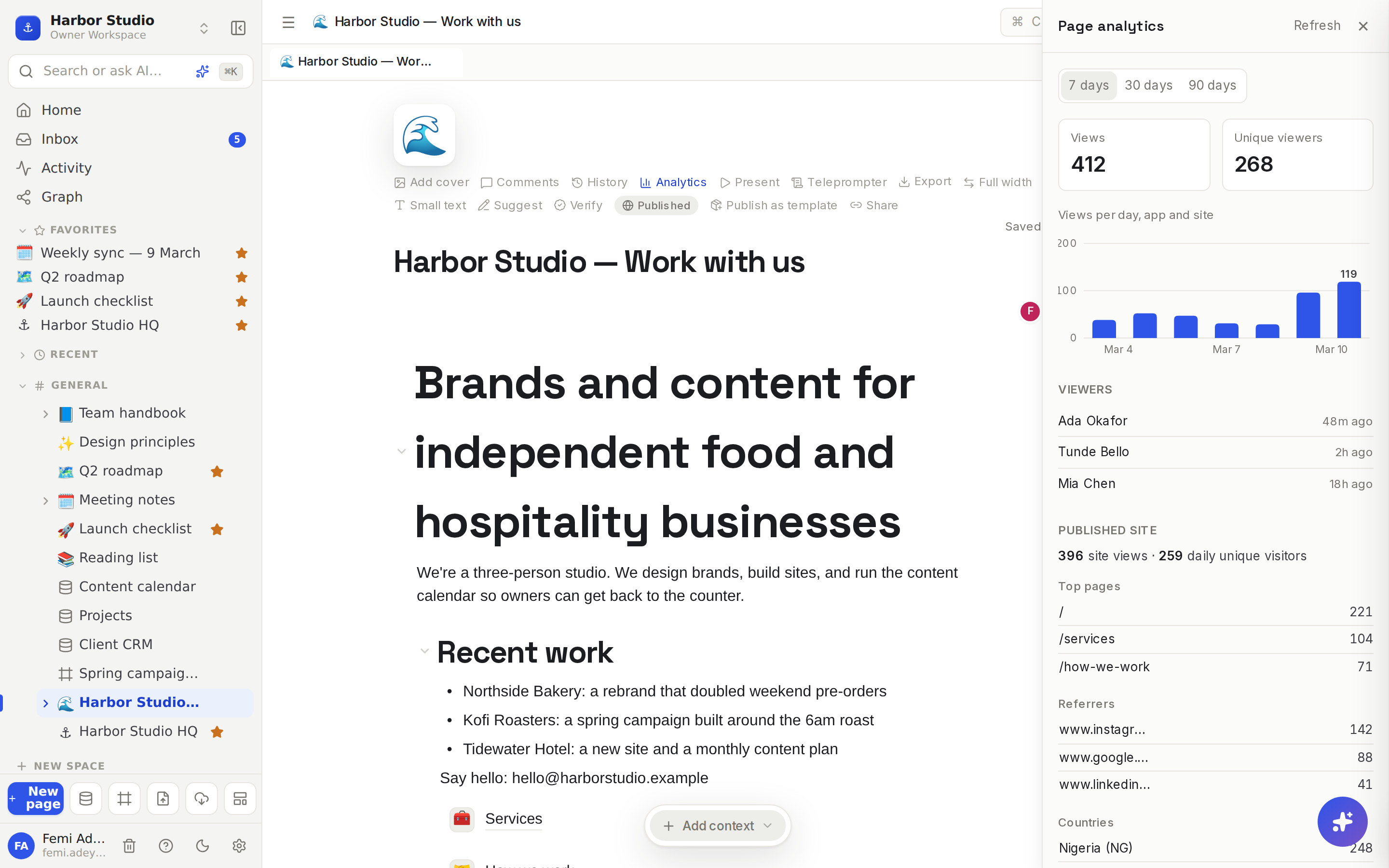
Hover over the title and click Analytics. The Page analytics panel opens on the right.
Choose 7 days, 30 days or 90 days.
Read the numbers:
Views and Unique viewers for the range, from the app and the published site together.
Views per day, app and site: a bar for each day.
Viewers: the teammates who opened the page, most recent first, with how long ago.
Published site, when the page is on a site: site views, daily unique visitors, then Top pages, Referrers (the sites visitors came from) and Countries.
The panel refreshes itself every 30 seconds while it's open, and Refresh updates it at once.
How views are counted
In the app: one view when a member opens the page, at most once every 30 minutes per person, so leaving a page open or flicking back to it doesn't inflate the count.
On the site: one view per page load by a visitor. Known bots, redirects and missing pages aren't counted.
Unique viewers are counted per day: someone who reads the page on Monday and Tuesday counts on both days.
Visitors stay anonymous. Rodeo never stores who a site visitor is: each visitor is recognised for one day only, separately on each site, and only the referring site's address is kept, never the full link.
History: Rodeo keeps 90 days of views, the longest range you can pick.
Tips and limits
Who sees names. The Viewers list is shown only to people who can edit the page. Everyone else who can open the page sees the totals and the chart.
Turn names off for everyone. Workspace owners and admins can go to Members & settings → Members, and under Page analytics set Viewer names to Totals only. With names on, people who can edit a page see who opened it.
Keep yourself out of the list. In Members & settings → Notifications, turn on Hide me from page viewer lists. Your views still count in the totals.
Former members still count in totals but are never listed.
Plans: views, unique viewers and the daily chart are available on every plan. The Viewers list and the site's Top pages, Referrers and Countries are available on Team, Business and Founders' Deal.

Ideas
Did the team read it? Before Monday's planning, Femi opens the analytics on "Q2 roadmap" to see whether Ada, Tunde and Mia have all opened it since it changed.
Is onboarding working? Open the analytics on "Onboarding" after each new hire's first week. No views means nobody's pointing them there.
Know your audience. On the studio site, check Referrers after a LinkedIn post and Countries before choosing a time zone for a webinar.
Troubleshooting
The chart says "No views in this range yet." Nobody has opened the page in that range. Try 30 days or 90 days.
I don't see the Viewers list. You can't edit the page, the workspace uses Totals only, or your plan doesn't include viewer names; the panel says which.
Site views are lower than another tool shows. Rodeo leaves out known bots, and counts are best effort when a site gets very busy.