Rodeo plans and pricing | Rodeo Docs
Rodeo is free forever for teams of up to 3, and when you outgrow that you pay per member, per month, for more seats, private spaces, unlimited guests and bigger AI allowances.
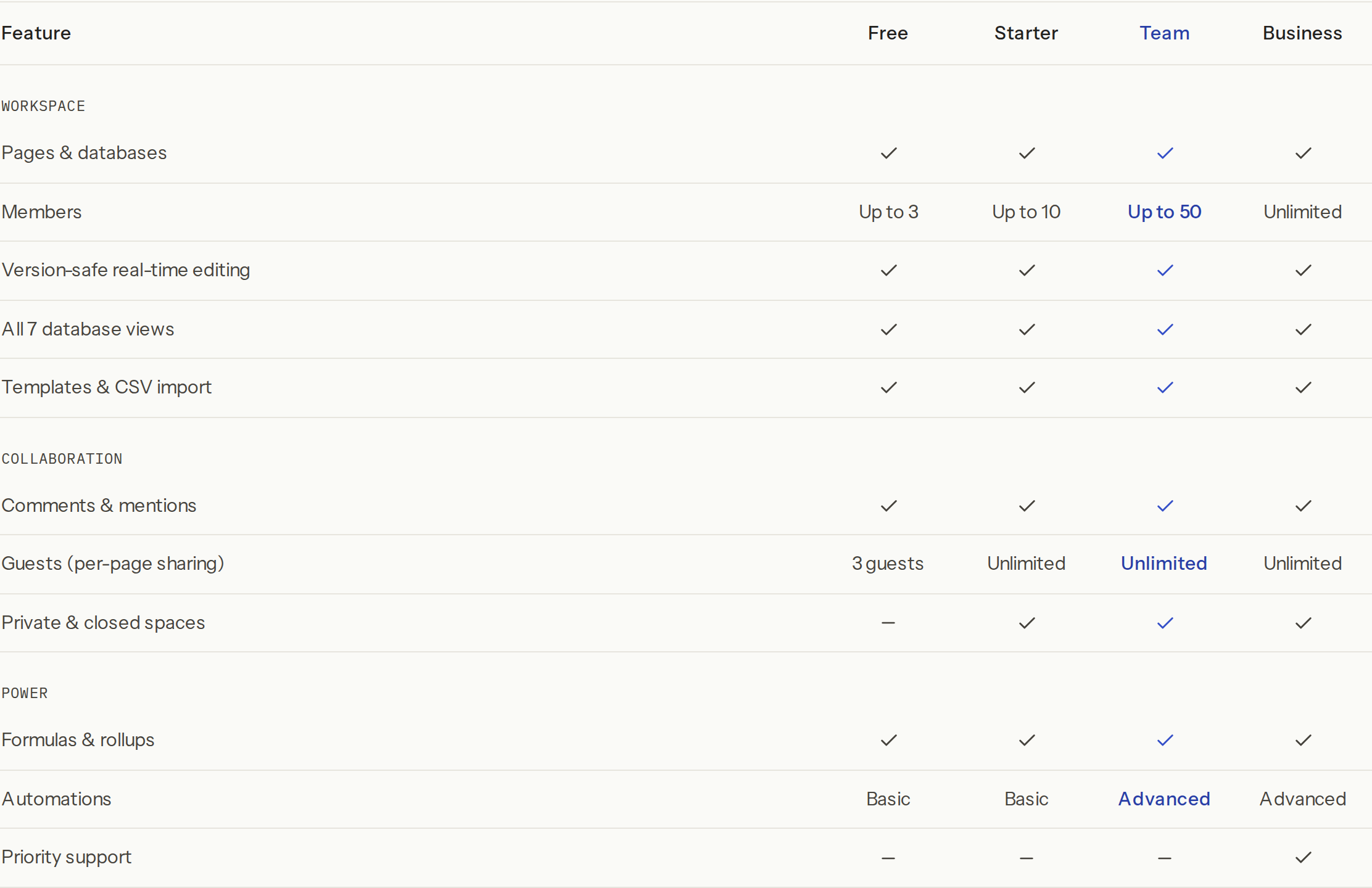
The plans
Plan | Price per member | Members | Guests | Best for |
|---|---|---|---|---|
Free | Free | Up to 3 | 3 | Individuals and small teams getting going |
Starter | $3 or ₦2,500 a month | Up to 10 | Unlimited | Growing teams that need private spaces and guests |
Team | $6 or ₦4,500 a month | Up to 50 | Unlimited | Teams that need control at scale |
Business | $10 or ₦8,000 a month | Unlimited | Unlimited | Organisations that want no caps and priority support |
Pay yearly and you get 12 months for the price of 10: Starter is $30 or ₦25,000, Team $60 or ₦45,000 and Business $100 or ₦80,000 per member per year. There is also a one-time Founders' Deal.
Every plan includes unlimited pages and databases, real-time editing, all 7 database views, templates and CSV import, comments and mentions, formulas and rollups, meeting notes, publishing a site, and boards.
Paid plans add private and closed spaces, unlimited guests, larger monthly allowances (see Usage), and the wiki index (see Wiki and page verification). Team and Business add custom domains for your sites, the names of who viewed a page in Page analytics, the Opus model in board chats, and advanced automations. Business adds priority support. The full grid is in Plan feature matrix.
Do it
See your plan
Click Members & settings at the bottom of the sidebar (or press ⌘K and choose Open settings).
The bar at the top of Members shows your plan. On Free it says how many members you use, for example "2 of 3 members used". On a paid plan it shows the plan, the member count, the price and the renewal date.
Upgrade
You need to be the workspace's owner or an admin.
In the plan bar, choose Monthly or Annual · 2 months free.
Click Upgrade to Starter, Upgrade to Team or Upgrade to Business. Each button shows the price per member in your currency, for example "$6/seat/mo".
Pay on the secure checkout page. You're charged for the members you have now.
You come back to "Confirming your upgrade…" and then to settings, now on the new plan.

In the desktop app, checkout opens in your browser ("Finish checkout in your browser") and hands you back to the app when you're done.
Switch plans
On a paid plan the buttons read Switch to …. You can also switch the same plan between monthly and annual. A switch is a new checkout for the new plan and your current members, and the new billing period starts that day. Time left on the old period isn't credited, so switching just before a renewal wastes the least.
Cancel
In the plan bar, click Cancel plan and confirm: "Cancel this plan? It stays active until the end of the current period."
The bar shows Cancels at period end. You keep every paid feature until then, and the workspace moves to Free at the end of the period. Nothing is deleted.
Tips and limits
Who counts as a member. Everyone in the workspace except guests: owners, admins and members. Guests never take a seat. See Members, roles and invites.
Hitting the cap. Inviting past your plan's member or guest limit fails with "You've reached your plan's member limit. Upgrade to add more."
Per-member billing follows your team. Each renewal charges for the members you have on that day, so add or remove people and the next charge adjusts.
Private and closed spaces need a paid plan. On Free, creating one says "Private & closed spaces are a paid feature." See Spaces.
Each workspace has its own plan. Paying for one doesn't upgrade your others.
Ideas
Start free, upgrade on day one of a client. Harbor Studio ran on Free with three people, then moved to Starter the week Kofi Roasters signed, so the client could join as a guest in a private "Kofi Roasters" space.
Annual for the core team. Femi pays Team yearly for the four permanent staff and saves two months, while freelancers join as guests at no cost.
Troubleshooting
I don't see any upgrade buttons. Only owners and admins can change the plan. Ask your workspace owner. If the bar says Paid plans · coming soon, paid plans aren't open for that workspace yet.
I paid but the workspace still says Free. Payment confirmation takes a few seconds. If the confirmation screen says your payment was received and the upgrade will apply in a moment, wait a minute and reload Members & settings.
I can't create a private space. Private and closed spaces need Starter, Team or Business.