Relations and rollups | Rodeo Docs
A relation links rows in one database to rows in another, and a rollup totals up what's linked, so your clients know their projects, your projects know their budgets, and nobody copies numbers between tables.
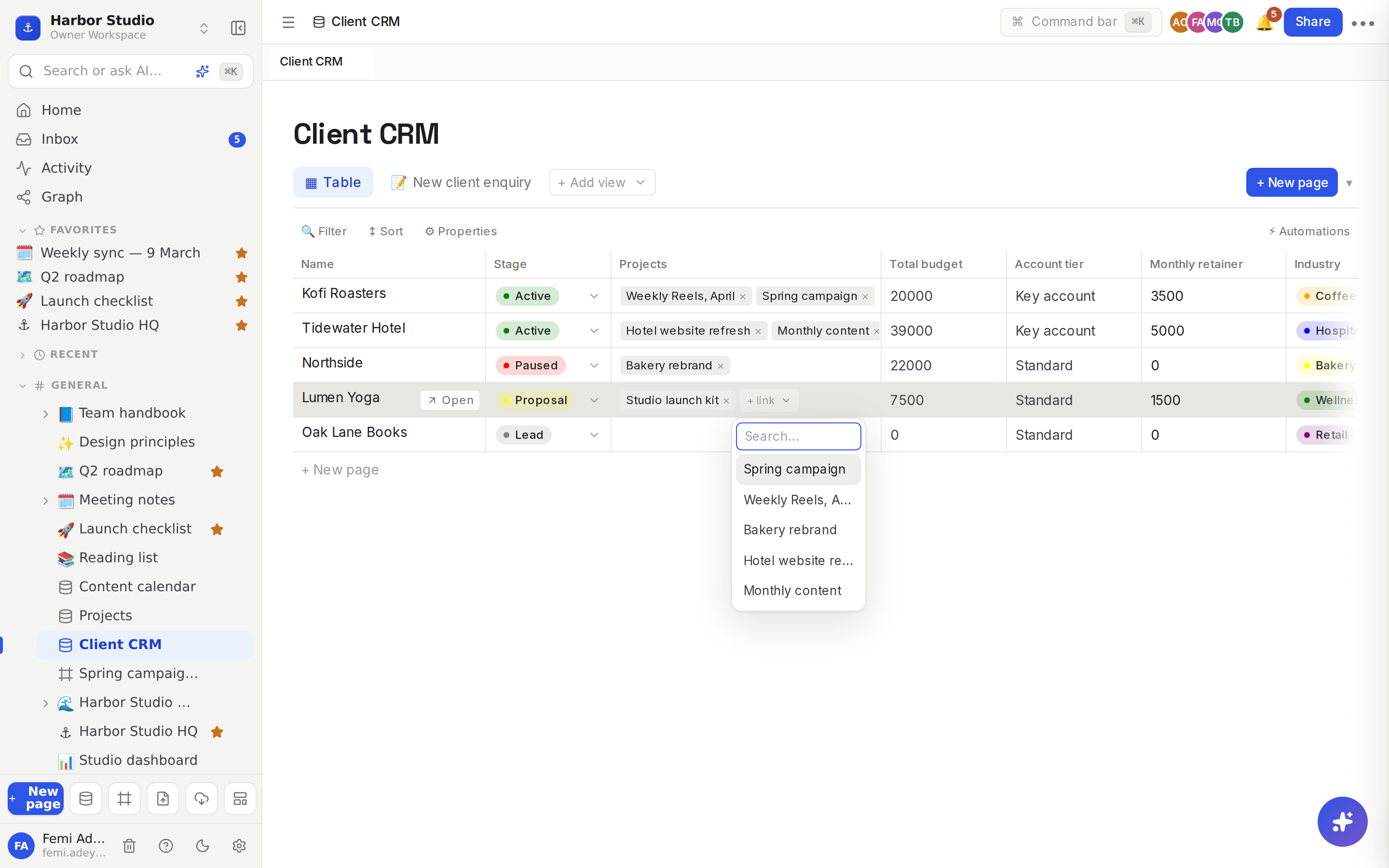
Harbor Studio keeps two databases: Client CRM and Projects. The CRM's Projects relation links each client to its projects, and a Total budget rollup adds up those projects' budgets. Kofi Roasters shows "Spring campaign" and "Weekly Reels, April", and a total of 20,000.
Do it
Add a relation
Open the database that should hold the links, for example Client CRM, in a table view.
Click + at the right end of the header row.
Name the property, for example "Projects", and choose Relation as the type.
Choose the database to link to under Target db…, for example Projects.
Click Add.
Link rows
Hover a relation cell and click + link.
Search for a row by typing part of its title, then click it. The linked row appears as a chip.
Add as many links as you need. Click a chip's × to unlink it.
You can link rows from a row's page too, where the relation shows with the row's other properties. See Row pages and row templates.
Add a rollup
Add the relation first.
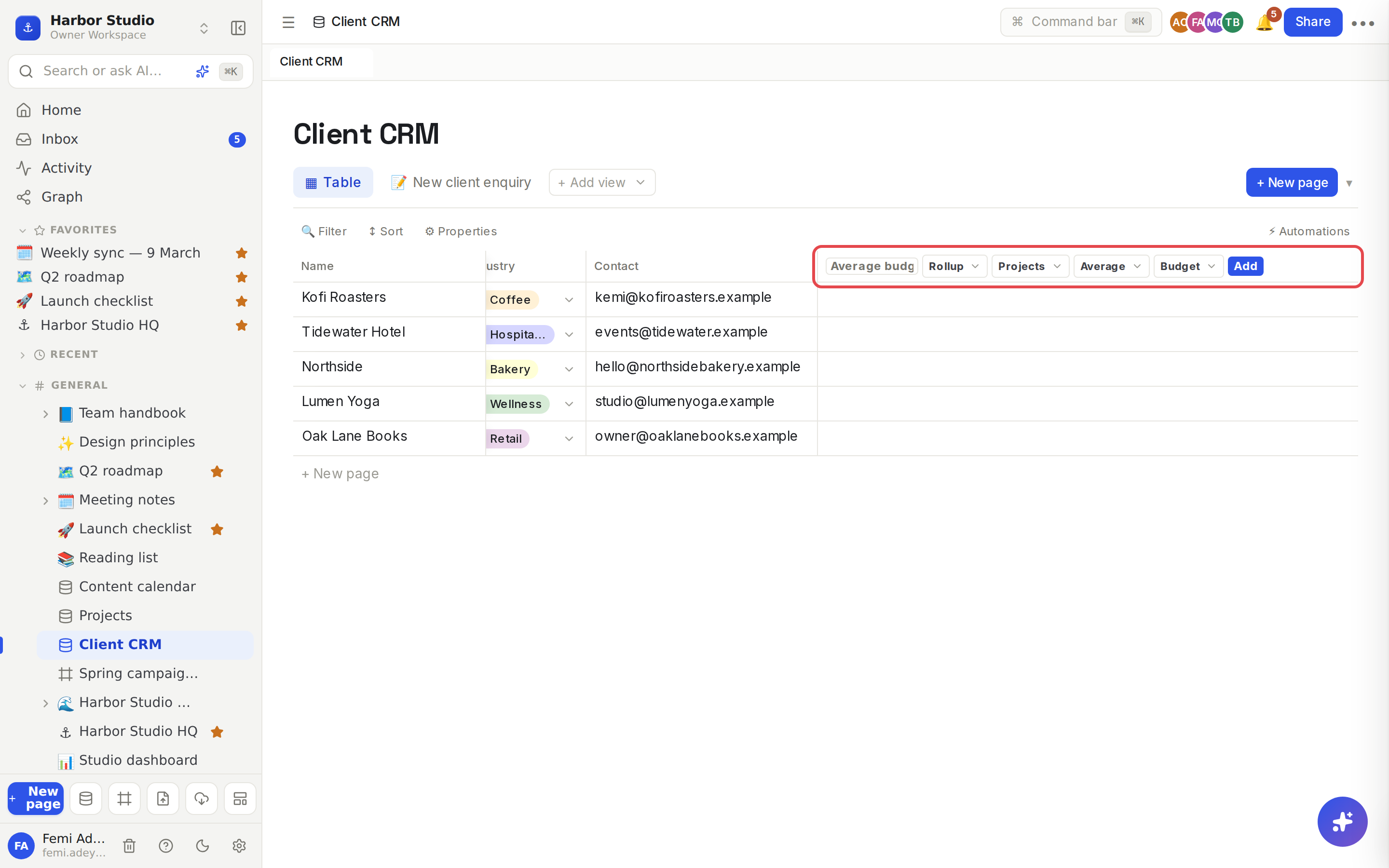
Click + at the end of the header row, name the property, for example "Total budget", and choose Rollup.
Under Relation…, choose the relation to read through, for example Projects.
Choose what to work out: Count, Sum, Average, Min, Max or Show values.
For anything but Count, choose the property of the linked rows under Property…, for example Budget.
Click Add.
Rollup | Gives |
|---|---|
Count | How many rows are linked. |
Sum | The linked values added up. |
Average | Their average (0 when nothing is linked). |
Min, Max | The smallest or largest value (0 when nothing is linked). |
Show values | The linked rows' values, listed with commas. |
Tips and limits
Relations are one-way. Linking a client to a project doesn't add a "Client" column to Projects. If you want links from both sides, add a relation in each database; they're kept separately.
A relation can't point at its own database from the add-property form.
Set it right the first time. A relation's target database and a rollup's settings can't be changed later. To change them, delete the property and add a new one. See Properties.
Sum, Average, Min and Max read numbers. Use them on Number properties. Rollups read the values stored in the linked rows, so they can't total another formula or rollup.
Show values works best with text, number and date properties.
Use rollups everywhere. A rollup is a value like any other: sort and filter by it, and feed it into a formula, for example round(prop("Total budget") / 12). See Formulas.
Privacy is kept. People only see linked rows, and rolled-up values, from databases they have access to. See Sharing and access requests.
Board columns from a relation. Group a board by a relation to get one column per linked row. See Board view.
Filter by a link: a relation contains a chosen row, or is empty for rows with no links. See Filters, sorts and grouping.
Relations and rollups work on every plan.
Ideas
Client totals. Link the Client CRM to Projects and roll up Sum of Budget, so Femi sees each client's lifetime value before a renewal call.
Busy clients. A Count rollup of Projects shows who has three projects running and who has none.
Average deal size. An Average rollup of Budget tells Ada which clients bring the big projects and which bring a steady stream of small ones.