Delete your Rodeo account | Rodeo Docs
You can delete your Rodeo account yourself, in one step, from the app or the web: Rodeo shows you exactly what goes with it first, and keeps what you wrote for your team so their work isn't left with holes.
What happens
Deleted for good:
your sign-in, so the account can never be used again;
your sessions on every device, so you're signed out everywhere;
your API tokens and connected apps, such as an AI assistant you connected over MCP (see Personal access tokens and Connect Claude, Cursor and other AI tools (MCP));
your favorites, notification settings and other personal settings;
your membership of every workspace.
Kept for your team: pages, comments and other content you wrote in workspaces shared with others. They stay where they are, shown as written by "Deleted user".
Workspaces only you own are deleted too. A workspace can't be left without an owner, so any workspace where you're the only owner goes with your account, including everyone else's work in it. Its published sites go offline at once.
Do it
Keep a workspace your team still needs
If you're the only owner of a workspace other people rely on, hand it over first:
Open the workspace menu at the top of the sidebar and choose Workspace settings.
Under Transfer ownership, pick a teammate and click Transfer. See Archive, transfer or leave a workspace.
Delete your account in the app
Click Members & settings at the bottom of the sidebar.
Open the Account tab.
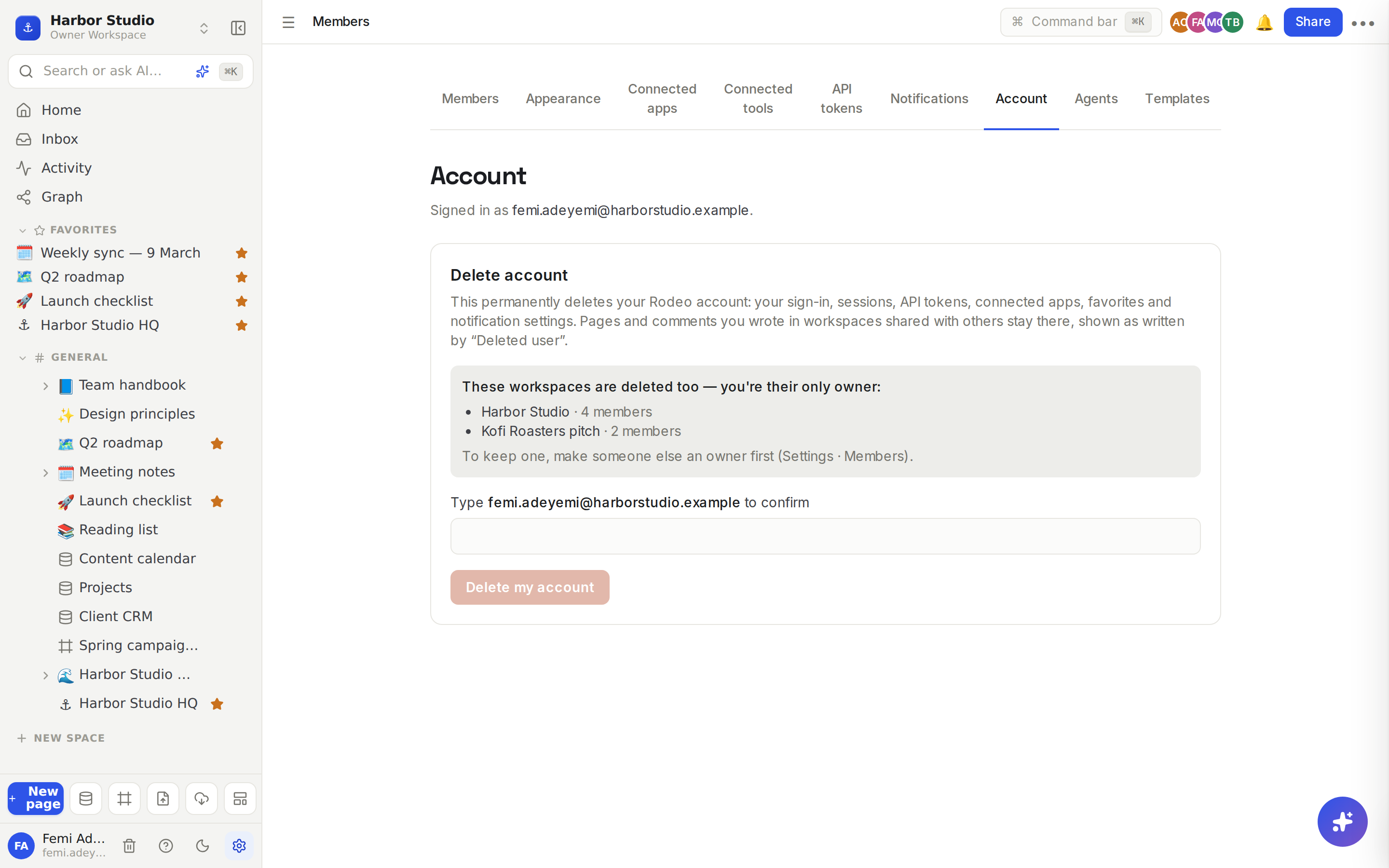
Read the Delete account panel. If it lists "These workspaces are deleted too — you're their only owner:", check the list, with each workspace's member count.
In the box that says "Type" followed by your email address and "to confirm", type that address.
Click Delete my account.
Rodeo confirms "Your account has been deleted. You've been signed out everywhere."
Delete it from the web
You don't need the app. Go to rodeo.so/account/delete, click Sign in to delete your account, sign in, and follow the same steps. This is the page the mobile app stores link to.
Tips and limits
It can't be undone from the app. Once deleted, the account can't sign in again.
Workspaces deleted with your account are kept for 30 days before they're purged for good, as a safety net against mistakes. To ask for one back within that window, email hello@rodeo.so.
Paid plans stop. Any paid plan on a workspace deleted with your account is cancelled, so it never renews.
Signing up again with the same email later creates a brand-new, empty account.
Sign in with Apple users: Rodeo also revokes its access to your Apple ID.
Plans. Anyone can delete their account, on any plan.
Ideas
Leaving a job. Before your last day, transfer the workspaces you own to your manager, then delete your account. Your docs stay with the team, credited to "Deleted user".
Closing a side project for good. You're the only person in it. Delete your account, and the workspace goes too, in one step.
Keeping just one of two accounts. Signed up twice with different emails? Move what you need into the account you're keeping, invite that account as owner, then delete the other.
Troubleshooting
The Delete my account button stays grey. The email you typed must match your account's email exactly, as shown in the panel.
It says I'm the only owner of a workspace. That workspace will be deleted with your account. To keep it, transfer ownership first, then come back.
It says it couldn't cancel a subscription. Rodeo stops a paid plan before deleting a workspace. Cancel that workspace's plan in Members & settings yourself, then try again.