Rodeo REST API | Rodeo Docs
The Rodeo REST API lets any program read and write your pages and databases over plain HTTPS and JSON, so you can sync a CRM, log deploys into a table or post a weekly report without anyone copying and pasting.
Basics
Base URL: https://api.rodeo.so/api/public/v1
Auth: Authorization: Bearer rodeo_pat_…, a token from Personal access tokens. The token decides the workspace, so you never pass one.
Format: JSON in and out. Every response is wrapped in the same envelope, with your result in data:
{
  "success": true,
  "message": "Request successful",
  "data": { },
  "statusCode": 200
}
Finding ids. Open the page or database in Rodeo and look at the address bar: p= is a page id, db= a database id. Copy link in the page's menu gives you the same.
Pages
Method and path | Scope | Does |
|---|---|---|
|
| Lists the workspace's pages, databases and boards you can see |
|
| Creates a page, at the top level or under |
|
| Moves a page under |
|
| Reads a page's blocks in order |
|
| Replaces one block (and its children) |
|
| Changes an image's URL, only if it still has the URL you expect |
|
| The page's wiki verification state |
|
| Adds a comment |
Create a page under another one:
curl -X POST https://api.rodeo.so/api/public/v1/pages \
  -H "Authorization: Bearer $RODEO_TOKEN" \
  -H "Content-Type: application/json" \
  -d '{"title": "Weekly report, 9 March", "parentId": "6f1c2b0e-3a4d-4c55-9e1f-0b7a8d2c9e41"}'
{
"success": true,
"message": "Resource created",
"data": {
"id": "0d9b7f3a-51c2-4e8b-a6f4-2c1e9b8d7a50",
"parentId": "6f1c2b0e-3a4d-4c55-9e1f-0b7a8d2c9e41",
"title": "Weekly report, 9 March",
"icon": null,
"cover": null,
"createdAt": "2026-03-10T10:00:00Z",
"updatedAt": "2026-03-10T10:00:00Z",
"type": "page",
"fullWidth": false,
"smallText": false
},
"statusCode": 201
}Comment on it:
curl -X POST https://api.rodeo.so/api/public/v1/pages/0d9b7f3a-51c2-4e8b-a6f4-2c1e9b8d7a50/comments \
  -H "Authorization: Bearer $RODEO_TOKEN" \
  -H "Content-Type: application/json" \
  -d '{"body": "Numbers are in. Sign-ups are up 18% on last week."}'
Databases and rows
Method and path | Scope | Does |
|---|---|---|
|
| The database's title, properties ( |
|
| Its rows; |
|
| Adds a row |
|
| One row |
|
| Changes only the properties you send |
|
| Deletes a row |
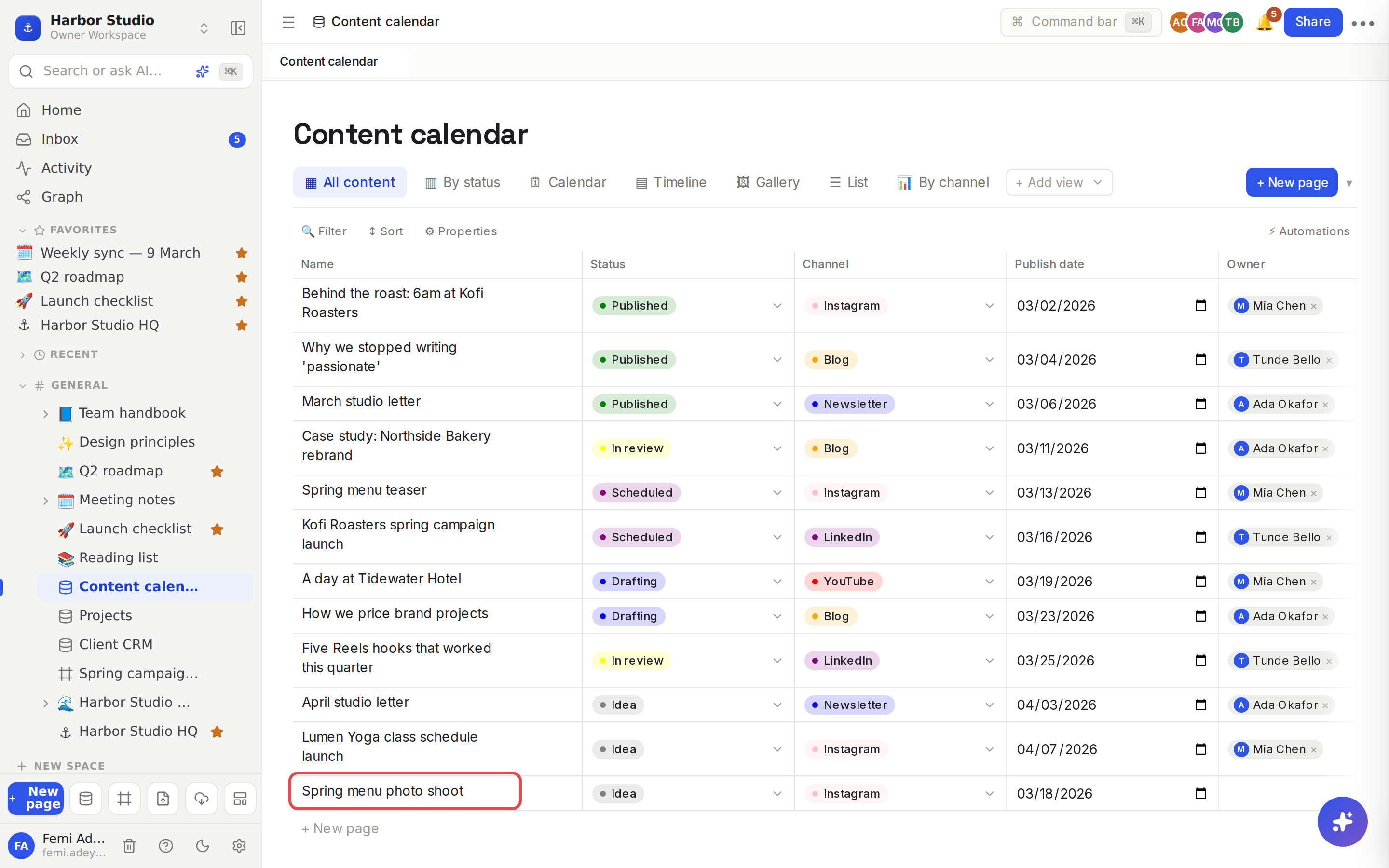
Row values are keyed by property id, not by name. Read the database first to get the ids:
curl https://api.rodeo.so/api/public/v1/databases/$DB_ID \
  -H "Authorization: Bearer $RODEO_TOKEN"
{
"data": {
"id": "8c2e4f1a-7b3d-4e9a-b5c6-1d2e3f4a5b6c",
"title": "Content calendar",
"titlePropId": "name",
"schema": [
{ "id": "name", "name": "Name", "type": "text" },
{ "id": "prop_4f2a9c1e", "name": "Status", "type": "status",
"options": [ { "id": "st_0", "name": "Idea", "color": "gray" }, { "id": "st_3", "name": "Scheduled", "color": "purple" } ] },
{ "id": "prop_7d1b0e3c", "name": "Publish date", "type": "date" }
]
}
}(Trimmed: the real response lists every property, option and view.)
Then add a row. Select and status values take the option id; dates are YYYY-MM-DD; a person property takes a list of user ids; a relation takes a list of row ids:
curl -X POST https://api.rodeo.so/api/public/v1/databases/$DB_ID/rows \
  -H "Authorization: Bearer $RODEO_TOKEN" \
  -H "Content-Type: application/json" \
  -d '{"values": {"name": "Spring menu photo shoot", "prop_4f2a9c1e": "st_0", "prop_7d1b0e3c": "2026-03-18"}}'
{
"success": true,
"message": "Resource created",
"data": {
"id": "3b5d7f9a-1c2e-4a6b-8d0f-2e4a6c8e0b1d",
"values": { "name": "Spring menu photo shoot", "prop_4f2a9c1e": "st_0", "prop_7d1b0e3c": "2026-03-18" },
"orderKey": "a3"
},
"statusCode": 201
}Mark it scheduled later. Properties you leave out stay as they are:
curl -X PATCH https://api.rodeo.so/api/public/v1/databases/rows/3b5d7f9a-1c2e-4a6b-8d0f-2e4a6c8e0b1d \
  -H "Authorization: Bearer $RODEO_TOKEN" \
  -H "Content-Type: application/json" \
  -d '{"values": {"prop_4f2a9c1e": "st_3"}}'
Files
POST /files (scope files:write) uploads one image as multipart/form-data in a field named file: PNG, JPEG, GIF or WebP, up to 10 MB. The response's data.url is the image's address, ready to use in an image block.
curl -X POST https://api.rodeo.so/api/public/v1/files \
  -H "Authorization: Bearer $RODEO_TOKEN" \
  -F "file=@shoot-moodboard.png"
Errors
Status | Means |
|---|---|
| No token, or it's wrong, revoked or expired |
| Missing scope ( |
| Not found, or not visible to you: Rodeo never reveals pages you can't see |
| A conflict, such as a plan limit |
| The request is invalid; |
| Over 120 requests a minute for this token |
Other errors use the envelope with "success": false and an error object holding a code and a message.
Tips and limits
Same rules as the app. The API goes through the same permission checks, and automations as clicks in Rodeo, and your teammates see changes live.
Unknown property ids are dropped without an error. If a value doesn't appear, check the id against schema.
Versioned path. Everything lives under /api/public/v1.
Plans. Every plan, including Free.
Ideas
Log every deploy. Your CI posts a row to a "Releases" database with the version and date, and the team sees a live changelog.
Two-way client tracker. A script mirrors new leads from your website form into the Client CRM, and PATCH keeps their stage in sync. See Relations and rollups.
Friday report in one command. Read the content calendar through the id of a view such as "Scheduled this week", create a page from it, and comment to tag the team.