Custom domains for published sites | Rodeo Docs
A custom domain serves your published site from an address you own, such as docs.yourcompany.com, so visitors see your brand in the address bar, with HTTPS set up for you.
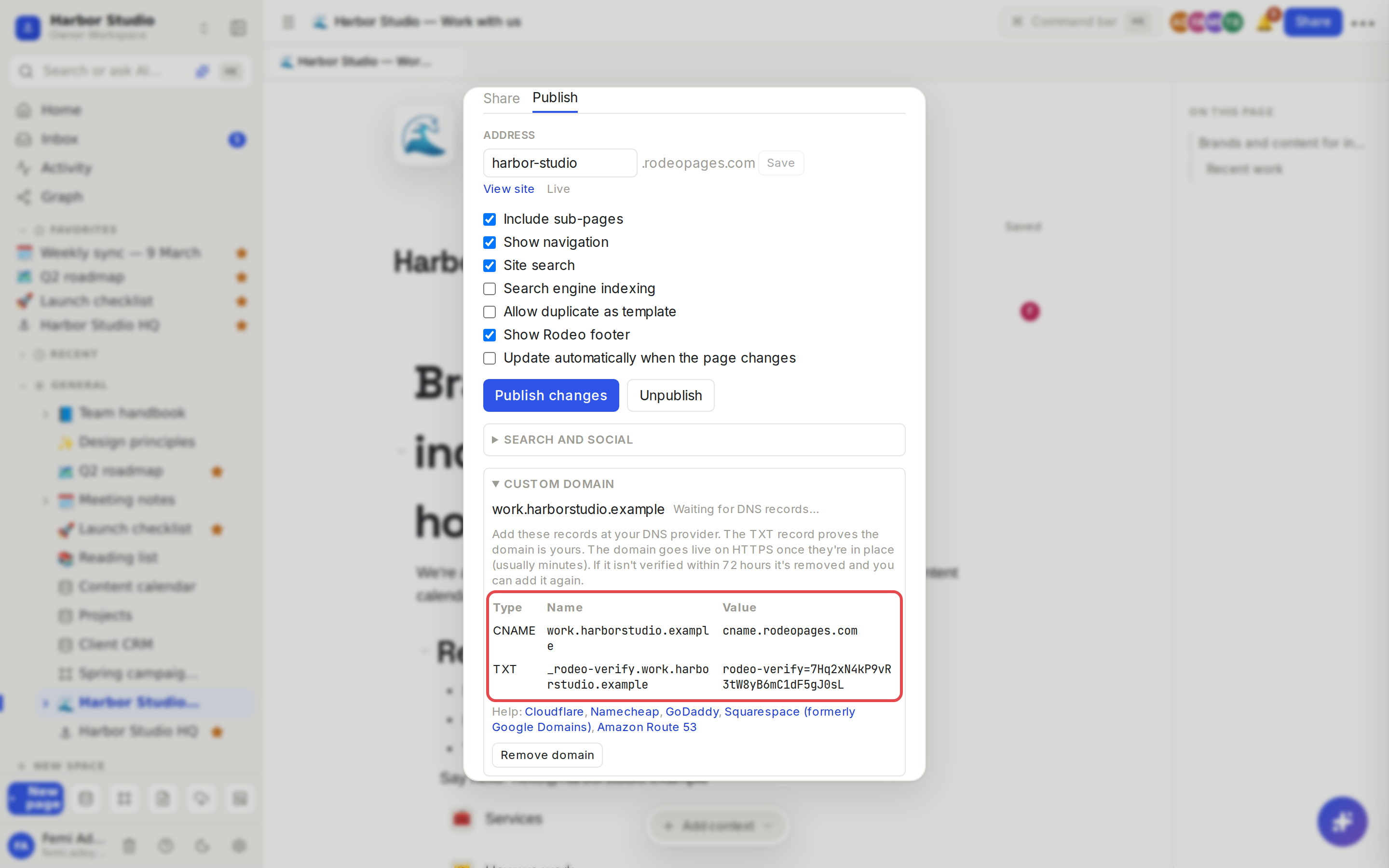
You keep control of your domain at your registrar or DNS provider. Rodeo tells you exactly which two records to add there: a CNAME that points your domain at Rodeo, and a TXT record that proves the domain is yours.
Do it
Connect a domain
Publish the site first. See Sites.
On the site's home page, click Share → Publish, and open Custom domain at the bottom.
Type the domain, for example docs.harborstudio.example, and click Add domain.
Rodeo shows a table of DNS records, each with a Type, Name and Value:
a CNAME record whose name is your domain and whose value is the target Rodeo shows;
a TXT record named _rodeo-verify. followed by your domain, with a value starting rodeo-verify=;
sometimes a second TXT record, if the certificate provider asks for one.
Sign in to your DNS provider and add each record exactly as shown. The Help links under the table go to the instructions for Cloudflare, Namecheap, GoDaddy, Squarespace and Amazon Route 53.
Leave the window. Rodeo checks the records every 2 minutes. The status moves through:
Waiting for DNS records…
Verified, issuing the HTTPS certificate…
DNS points here; waiting for the _rodeo-verify TXT record…
Active, with the domain shown as a link.
It usually takes minutes. Once it's Active, your domain is the site's main address: the rodeopages.com address redirects to it, and search engines and link previews use your domain.
Remove a domain
Click Remove domain and confirm. The site stops answering on that domain and goes back to its rodeopages.com address. You can add the domain again later.
Tips and limits
Root domains. Most providers can't put a CNAME on a root domain like harborstudio.example. Use CNAME flattening (Cloudflare) or an ALIAS or ANAME record (Route 53, Namecheap and others) pointing at the same target, or use a subdomain such as www or docs.
72 hours to finish. If a domain isn't verified within 72 hours, Rodeo removes it and frees the slot. Fix the records and add it again.
One domain per site. To change it, remove the old one first.
Unpublishing keeps the domain. Publish again and the site comes back on the same domain, with no DNS changes.
Not allowed: wildcard domains, IP addresses, ports or paths, and addresses on rodeo.so or rodeopages.com.
Leave the records in place. The TXT record keeps the domain tied to your workspace, so nobody else can claim it.
Plans: custom domains are available on Team, Business and Founders' Deal. Team and Founders' Deal include 1 custom domain per workspace, Business includes 5.
Ideas
Docs on your own domain. Publish your help center and connect help.yourcompany.com, the way docs.rodeo.so runs on Rodeo.
A portal per client. Give Kofi Roasters a portal at kofi.harborstudio.example, on the Business plan, with other clients on their own subdomains.
Rebrand without broken links. Connect the new domain to the existing site: the old rodeopages.com address redirects, so links you've already shared keep working.
Troubleshooting
It's been a while and it still says Waiting for DNS records. Check the record names. Some providers add your domain to the name automatically, so enter only the part they ask for (for example docs, not docs.harborstudio.example). DNS changes can take time to spread.
"… has an unverified claim from another workspace". Someone started connecting this domain and didn't finish. If you control its DNS, add the TXT record Rodeo shows with the message, then click Add domain again.
"… is already connected to a site". The domain is live on another site. Remove it there first.
"This workspace has used all the custom domains its plan includes". Remove a domain from another site, or upgrade. See Plans and limits.
The Add domain button is greyed out. Your plan doesn't include custom domains; the panel says so under the field.