Wiki and page verification | Rodeo Docs
Verification lets the person who owns a page vouch that it's correct, for a set time, so your team can tell the trusted handbook page from last year's draft at a glance, and the wiki index shows which pages need attention before anyone relies on them.
Verification is per page. Every page has an owner, the person who created it unless someone changes it. The owner marks the page verified until a date, and Rodeo reminds them before it lapses.
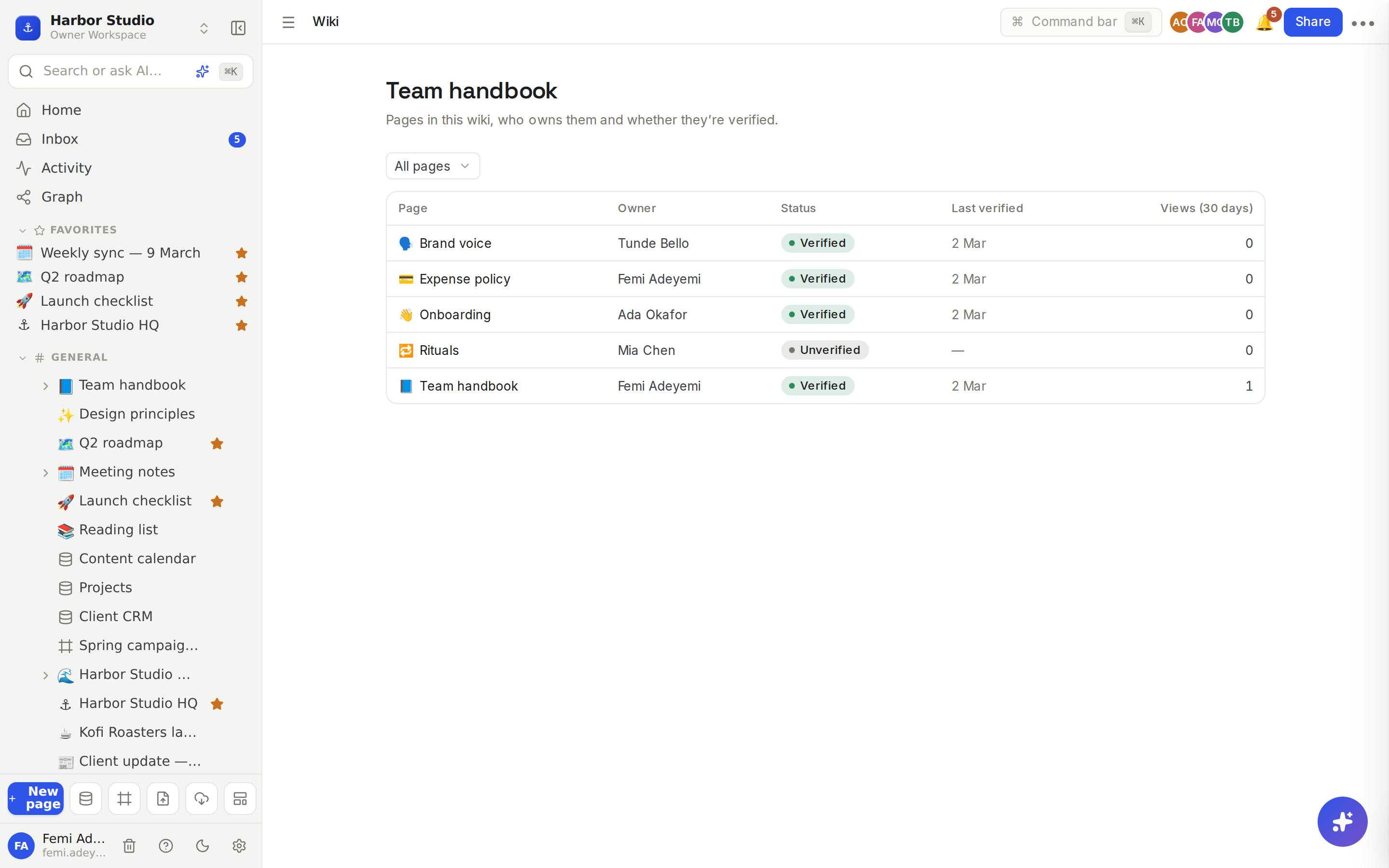
A wiki is a space, or a page and everything under it, listed in one wiki index: each page with its owner, its verification status and how often it's read.
Do it
Verify a page
Open the page and hover over the title. Click Verify in the row of buttons above it. A verified page shows its status there instead, for example Verified by Femi Adeyemi.
The Verification panel opens on the right. Under Owner, check who owns the page, and change it if needed.
Under Verify for, choose 7 days, 30 days, 90 days, Until date or Indefinitely.
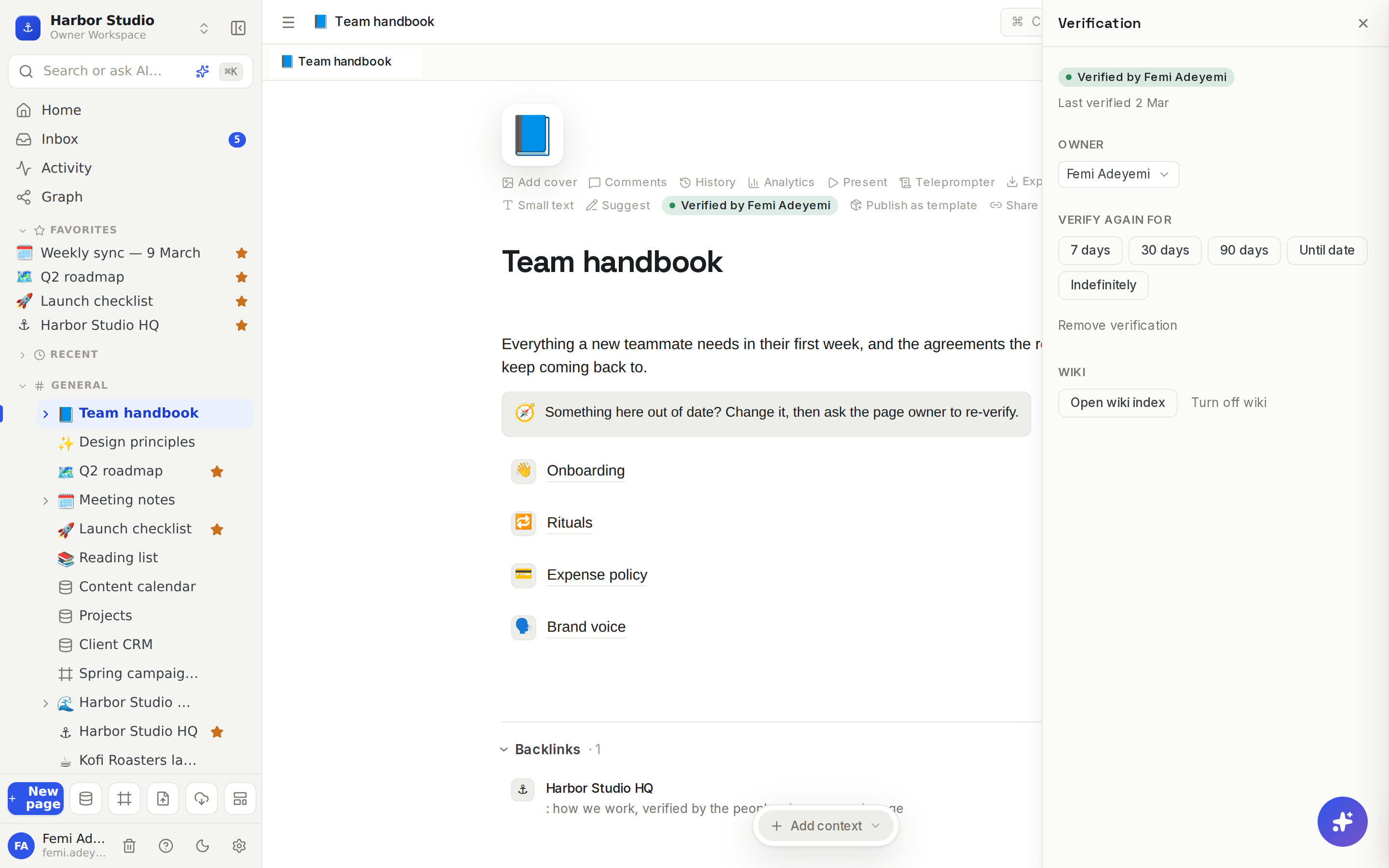
To renew, open the panel again and pick a new length under Verify again for. Remove verification takes it away.
Turn a set of pages into a wiki
For a page and its sub-pages: open the page's Verification panel and click Turn on wiki for this page. Anyone who can edit the page can do this.
For a whole space: hover the space in the sidebar, click its menu, choose Settings & members, and under Wiki click Turn on wiki. Workspace owners and admins can do this. A wiki space shows a small book icon in the sidebar.
Use the wiki index
Open it with Open wiki index, from the page's Verification panel or the space's menu.
The table lists every page in the wiki with Owner, Status, Last verified and Views (30 days).
Use the filter to narrow the list: All pages, Expired, Expiring soon, Unverified, Changed since verified or Most viewed, not verified.
Click a page to open it and verify it.
How verification stays honest
Status | What it means |
|---|---|
Verified | The owner vouched for it, and it hasn't lapsed. |
Expiring soon | It lapses within 7 days. |
Expired | Its time ran out. |
Unverified | Nobody has verified it, or it was removed. |
Edits by others. When someone other than the owner edits a verified page, it's flagged as Changed ("Changed by Ada Okafor since it was verified"), so the owner knows to take a look. An admin can make such edits remove the verification instead: in Members & settings → Members, under Wiki, set Edits by others to Remove verification (the default is Flag the page).
Reminders. Owners get an Inbox notification when a page is about to lapse and when it lapses. See Inbox and notifications.
Weekly email. Owners also get one email a week listing their expiring and expired pages, each with a one-click Re-verify link. Turn it off in Members & settings → Notifications → Weekly verification digest.
Ask AI warns you. When an answer cites a page whose verification has expired, the source says "This source expired 3 days ago". See Ask AI.
Tips and limits
Who can verify: the page owner, or a workspace admin with edit access to the page. The owner can be any workspace member (not a guest) who can edit the page.
Until date accepts any date from tomorrow up to five years ahead.
Database rows can't be verified; verification is for pages.
The wiki index lists up to 500 pages.
Plans: verifying pages works on every plan. The wiki index, and the weekly email, are available on Starter, Team, Business and Founders' Deal.
Ideas
A handbook new hires can trust. Turn "Team handbook" into a wiki, make Ada the owner of "Onboarding" and Tunde the owner of "Brand voice", and verify each for 90 days. Every quarter, the reminders do the chasing.
Policy pages that never go stale. Verify the "Expense policy" until the end of the financial year, so Femi gets a reminder exactly when it needs a review.
Fix what people actually read. Filter the wiki index by Most viewed, not verified and start there.
Troubleshooting
There's no Verify button on the page. Only the owner, or an admin who can edit the page, sees it. Everyone else sees the status once the page is verified.
The wiki index says it's on the Starter plan and up. Your workspace is on Free. Upgrade to use the wiki index; verification itself still works. See Plans and limits.
My verified page shows Changed. Someone else edited it. Read their change, then verify it again to clear the flag.