Looks and house style | Rodeo Docs
A look restyles all of Rodeo at once, its colours, fonts, spacing and motion, so you can work in the setting that suits you, and a house style gives your whole team a shared starting point without taking that choice away.
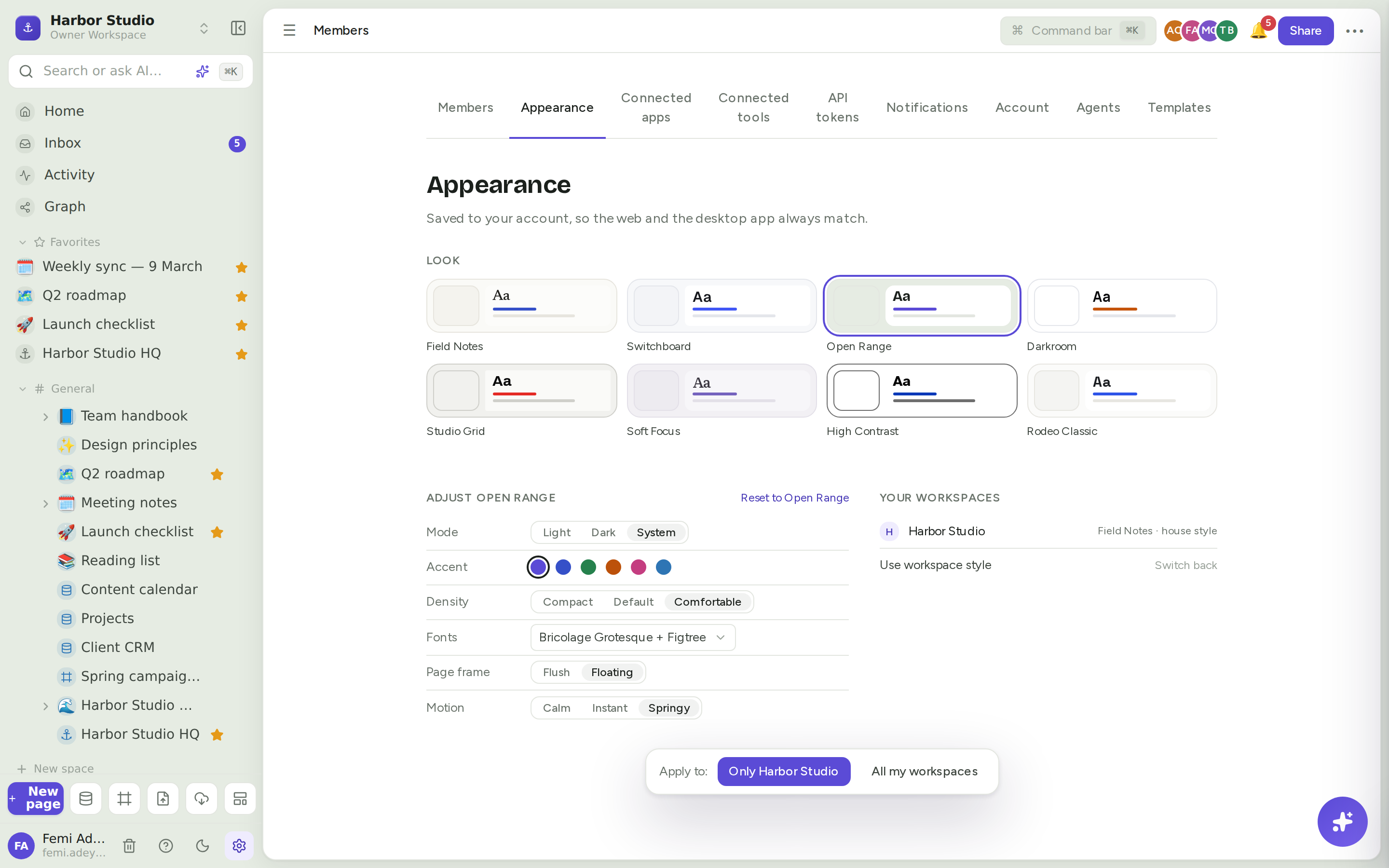
The eight looks
Look | Fonts | Spacing and feel | Starts in |
|---|---|---|---|
Field Notes | Newsreader serif | Comfortable, calm motion | Light |
Switchboard | Geist | Compact, instant | Dark |
Open Range | Bricolage Grotesque | Comfortable, floating page, springy, a colour per space | Light |
Darkroom | Manrope | Default spacing, instant | Dark |
Studio Grid | Archivo | Compact, instant | Light |
Soft Focus | Literata serif | Comfortable, calm motion | Light |
High Contrast | Atkinson Hyperlegible | Comfortable, 7:1 text contrast | Light |
Rodeo Classic | Space Grotesk | Default spacing, the original Rodeo | Your device's setting |
Do it
Choose your look
Click Members & settings at the bottom of the sidebar, then the Appearance tab.
Under Look, click a card. Rodeo previews it straight away, across the whole app.
A bar appears at the bottom: Apply to:
Only Harbor Studio (your current workspace's name) keeps the look in this workspace only.
All my workspaces uses it everywhere you work.
If other workspaces already have their own look, Rodeo asks whether to Replace them or Keep them.
Pressing Esc, or leaving the page without answering, applies the look to the current workspace only.
Adjust it
Under Adjust and the look's name, fine-tune it. Each change previews at once and asks Apply to: again.
Setting | Choices |
|---|---|
Mode | Light, Dark, System |
Accent | The look's own colour, or Cobalt, Green, Amber, Pink or Blue |
Density | Compact, Default, Comfortable |
Fonts | The font pairing of any of the eight looks |
Page frame | Flush, Floating |
Motion | Calm, Instant, Springy |
Reset to and the look's name puts every adjustment back.
Switch between light and dark
Click the moon or sun button at the bottom of the sidebar, or press ⌘K (Ctrl+K) and run Toggle dark mode. You can also set Mode in Appearance. Mode changes save straight away, with no Apply to: question.
See what each workspace uses
Your workspaces, on the right of the Appearance tab, lists each workspace with its look and where it comes from: only here, all workspaces, house style or default. Click Switch back next to Use workspace style to drop your own look for this workspace and follow the house style again.
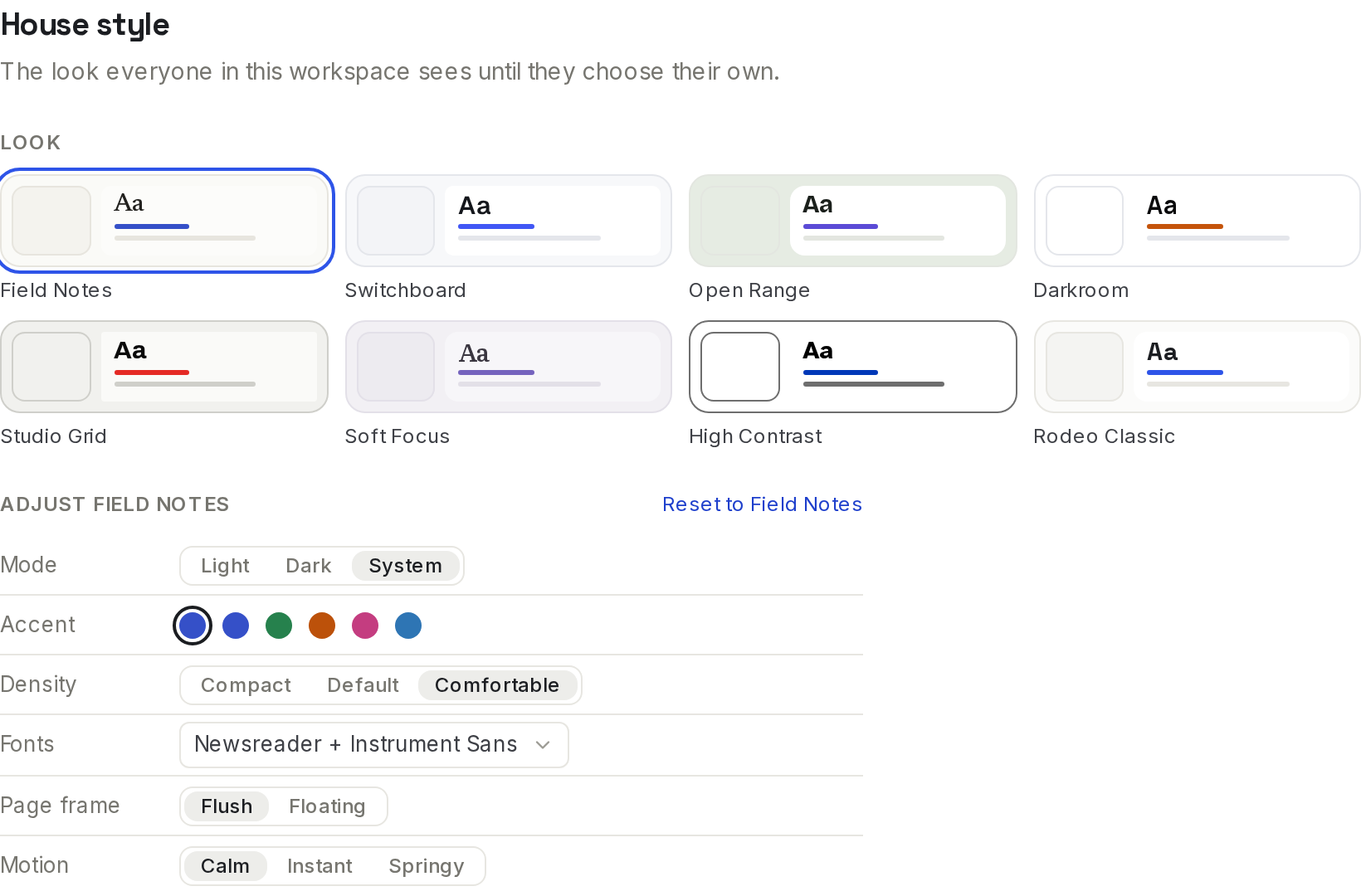
House style
The house style is the look everyone in the workspace sees until they choose their own. Workspaces start in Rodeo Classic.
As a workspace owner or admin, open Members & settings → Members.
Scroll to House style.
Pick a look and adjust it. It saves straight away for everyone who hasn't picked their own.
Shared forms are shown in the house style too, so people filling them in see your brand. See Forms.
Tips and limits
Your look follows you. It's saved to your account, so the web app and the desktop app always match. See Desktop app.
What wins: your look for this workspace, then your look for all workspaces, then the house style.
High Contrast keeps its own accent so text stays at 7:1 contrast; accent choices don't apply to it.
Open Range colours each space. Pages in different spaces get their own accent, unless you pick an accent yourself. See Spaces.
Guests can choose a look for the workspace they're a guest in, but not for all workspaces.
Published sites have their own reading style, in each visitor's light or dark mode, whatever look your workspace uses. See Sites.
Looks are available on every plan.
Ideas
Night shift. Tunde edits video late, so he picks Switchboard for all his workspaces, while the rest of the studio stays on the house style.
Brand the workspace. Femi sets the house style to Field Notes with the Amber accent, so the studio's workspace and its shared forms feel like Harbor Studio.
Easier reading. Ada picks High Contrast with Comfortable density for long proofreading sessions.
Troubleshooting
I don't see House style. Only workspace owners and admins see it.
My look changed back. You may have applied it to one workspace only. Check Your workspaces and apply it to All my workspaces.
Teammates don't see my look. Your look is personal. To change what everyone sees, set the house style.